Feature Friday Episode 22: Commission Amount Basis in Commissions Management for Business Central
.svg)

How commissions are calculated can have a significant impact on sales performance, compensation accuracy, and overall business profitability.
Many organizations use commission structures to incentivize sales activity, but not every business calculates commissions the same way. Some organizations reward revenue growth, while others focus on profitability. Certain industries may require specialized calculations or flat-rate incentives that don't fit into traditional commission models.
Without the flexibility to support different commission methods, businesses often find themselves using workarounds, maintaining multiple commission processes, or manually adjusting commission payouts after calculations have been completed.
Some of the most common challenges include:
- Limited flexibility in commission calculations
- Commission structures that don't align with business objectives
- Difficulty supporting unique compensation plans
- Manual adjustments to commission payouts
- Recalculating commissions after rule changes
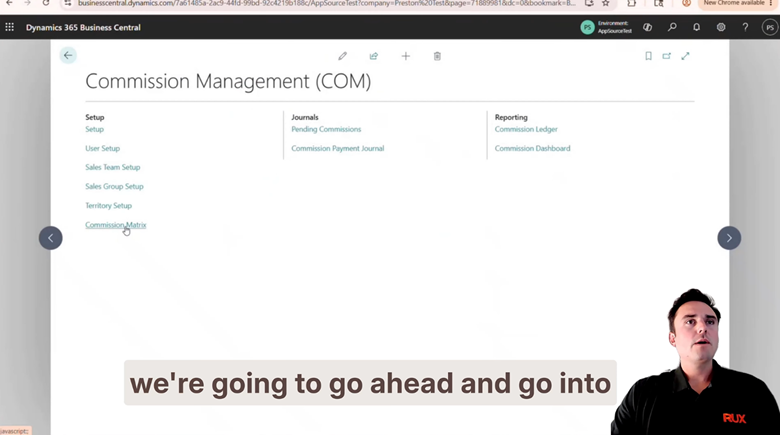
In Feature Friday Episode 22, Preston, RUX Lead Consultant, demonstrates how the Commission Amount Basis feature in Commissions Management provides businesses with greater flexibility when calculating commissions.
Why commission calculation methods matter
Commission plans are rarely identical across organizations. While revenue-based commissions are common, some businesses place greater emphasis on profitability, margin protection, or industry-specific calculations.
As commission plans become more sophisticated, organizations need the ability to calculate commissions in a way that accurately reflects how performance should be rewarded.
The ability to select different commission amount bases helps businesses align compensation plans with operational goals while maintaining consistency and accuracy throughout the commission process.
What works for one organization may not work for another, making flexibility an important part of any commission management solution.
A smarter approach to commission calculations
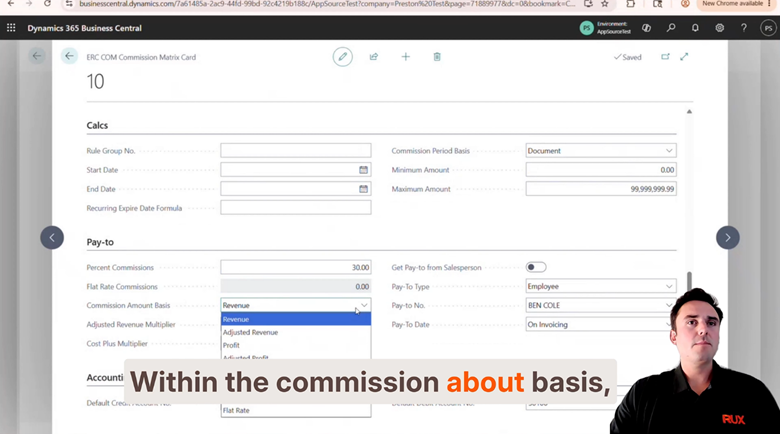
The Commission Amount Basis functionality allows users to determine exactly how commissions should be calculated within a commission rule.
As demonstrated in the Episode 22 video, users can select from several commission amount basis options directly within the Commission Matrix.
Available options include:
- Revenue-Based Commissions – Calculate commissions using transaction revenue amounts.
- Profit-Based Commissions – Incentivize profitability by calculating commissions against profit values rather than revenue.
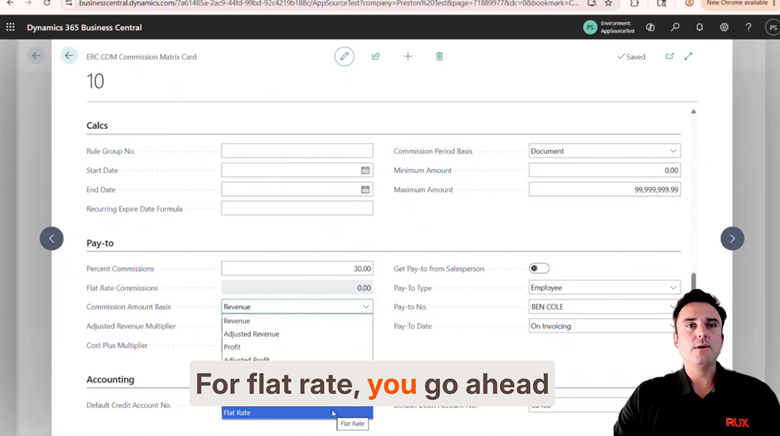
- Flat-Rate Commissions – Assign a fixed commission amount regardless of revenue or profitability.
- Adjusted Revenue and Adjusted Profit – Support specialized business requirements by calculating commissions against modified revenue or profit values.
- Custom Calculation Methods – Accommodate unique commission structures that fall outside traditional calculation models.
- Industry-Specific Cost Methods – Support cost-plus and actual-cost calculations for organizations that require more advanced commission calculations.
Built for real-world commission programs
Commission plans evolve over time. As organizations grow, compensation strategies often change to support new objectives, incentive structures, or operational requirements.
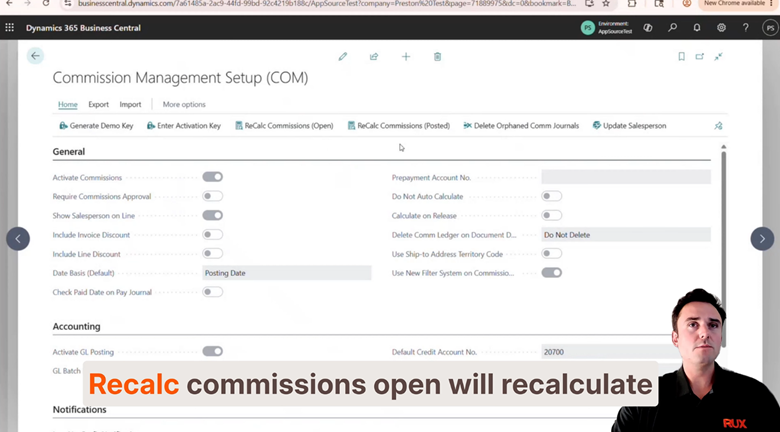
If changes are made to a commission amount basis after commissions have already been calculated, users can quickly recalculate commissions through the setup page.
Available recalculation options include:
- Recalculate Commissions (Open Documents)
- Recalculate Commissions (Posted Documents)
This allows organizations to maintain accurate commission records without manually recalculating individual transactions.
.
By giving businesses the flexibility to choose how commissions are calculated, Commissions Management helps ensure compensation plans remain aligned with business goals while reducing administrative effort.
Watch the full Feature Friday episode.
In the Episode 22, Preston also walks through:
- Navigating the Commission Management menu
- Accessing the Commission Matrix
- Configuring commission rules
- Flat-rate commission setup
- Revenue and profit-based commission calculations
- Adjusted calculation options
- Recalculating commissions after making changes
If your organization uses multiple commission structures or requires flexibility in how commissions are calculated, this episode demonstrates how Commissions Management can support a wide range of compensation models.
If this sounds helpful, explore more Business Central productivity tips on the RUX Software YouTube Channel and subscribe so you never miss a Feature Friday episode.



Ready to take control of your operations?
RUX engineered oil and gas field service software to fit your operation—no patches, no guesswork. Business Applications built and configured for the oilfield service industry, our software solutions give you clarity and control to move forward with confidence.